Desktop Notifications with WebKit
Chrome now supports desktop notifications using WebKit's webkitNotifications API. (Try the demo.)
Why is this awesome? Because it gives online tools like e-mail clients, calendering software, task managers, monitoring systems, etc. an elegant and consistent way to notify users without having to resort to annoying and invasive hacks like window.alert.
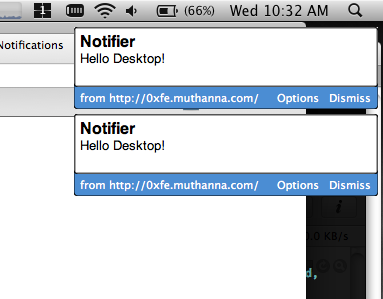
Stacked Desktop Notifications
Although the API is sparsely documented, it is simple and flexible and supports features such as domain based permissions, stacking of notification windows, embedded HTML, etc.
To use desktop notifications in your applications, you need the following three API calls:
window.webkitNotifications.requestPermission(callback)- Request access to Desktop Notifications for this domain.window.webkitNotifications.checkPermission()- Returns0if this domain has Desktop Notification access.window.webkitNotifications.createNotification- Returns a popup notification instance, which you can display by callingshow()on it.
A straightforward way to check for Desktop Notification support is by testing if window.webkitNotifications is defined. Take a look at Notifier.HasSupport() in the API wrapper below.
When you request permission with requestPermission(callback), Chrome slides out a small permissions dialog immediately above the page. (Click the image below to magnify.)
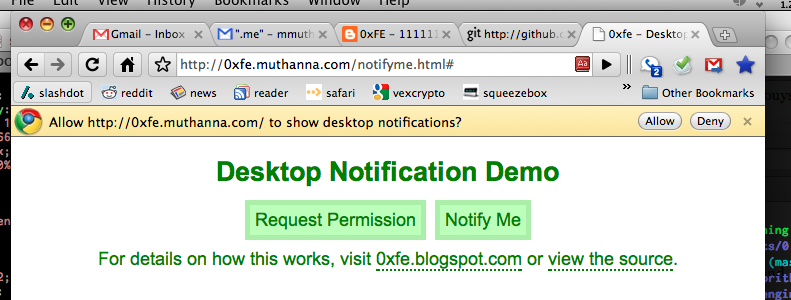
Permissions Dialog for Desktop Notifications
In the above image, licking "Allow" tells Chrome that all pages hosted on 0xfe.muthanna.com can send notifications to the desktop. You can remove this access by clicking the "Options" link on any notification from a site.
Here's a simple wrapper to the API (which is embedded in the demo below):
function Notifier() {}

// Returns "true" if this browser supports notifications.
Notifier.prototype.HasSupport = function() {
  if (window.webkitNotifications) {
    return true;
  } else {
    return false;
  }
}

// Request permission for this page to send notifications. If allowed,
// calls function "cb" with "true" as the first argument.
Notifier.prototype.RequestPermission = function(cb) {
  window.webkitNotifications.requestPermission(function() {
    if (cb) { cb(window.webkitNotifications.checkPermission() == 0); }
  });
}

// Popup a notification with icon, title, and body. Returns false if
// permission was not granted.
Notifier.prototype.Notify = function(icon, title, body) {
  if (window.webkitNotifications.checkPermission() == 0) {
    var popup = window.webkitNotifications.createNotification(
      icon, title, body);
    popup.show();
    return true;
  }

  return false;
}
Take a look at the WebKit Desktop Notification Demo for a working demo. [ View Source ]
34 comments (imported from blogger)
Never saw anything like this before....
Yup, so to try this out, I have to go to the webpage, then start licking the screen over the allow button. I can see it: the next thing WebKit will implement after [multi]touch events is lick events!
document.addEventListener("lickstart", ...
Chrome Desktop Notifications and why they are useless
@Anonymous - Lick it good! (good catch)
@Andrew Mason - My guess is that this will take a path similar to Gears - it will help drive the development of some standard spec for desktop notifications, and will eventually become deprecated.
http://i.imgur.com/qFsS0.png
Nice for sharing.
Thanks for the demo though…
Will give it a weekend hack :)
http://gecko.hp2.jp/chrome_notify/
example----------
popup.ondisplay = function(){}
popup.onerror = function(){}
popup.onclose = function(){}
-----------------
Could you see though it is Japanese?
This is what i was looking for since long
Thanks,
Parth J Joshi
www.parthjoshi.com
A few salient details you might mention in your post:
1. The "body" of the notification is plain text. There is no HTML rendering. In case people wondered.
This is too bad as you can't include a link; people have to return to the originating page on their own.
An onClick callback per alert would be cool; Fluid's window.fluid.showGrowlNotification (implemented on Firefox via Yip extension) allows an onClick callback for the alerts, which is very handy. E.g. if an RSS reader downloads a new item of particular interest and pops up an alert, clicking on the alert can take you to the original item/web page of interest (and always makes the alert go away IIRC).
2. Worth noting: There is a maximum number of alerts depending on your monitor; four is the max on my 13 inch MacBook Pro and eight is the max on my 30 inch monitor. This is for all Chrome alerts, shared between pages, so if one web page pops up three alerts and another pops up two, one alert will be hidden.
When the maximum is exceeded, the first $max_num hold in place; as they are closed, the newer alerts come in from the bottom.
3. On a Mac, the alerts do not show up in Expose or in Chrome's Window menu. Hmm. They also do not relocate if you change monitors. However, they will relocate as soon as an additional alert is generated.
4. The alerts will accept quite a volume of text and will even activate a scroll bar if needed. If there is a maximum amount of data I have not found the max.
5. The "body" is optional but best to include an empty string or you get "undefined" as the body.
6. It's very cool that this works without Growl installed however when Growl IS available would be nice if it just used Growl instead.
Anyway, very cool overall.
Chrome - it's IE all over again - but it's okay because it's open source, right?
wrong.
mass notifications