All new VexFlow and VexTab!
Here's the opening of Chopin's Ballade No. 3 in A-flat major, engraved with VexFlow. Hit the play button on the sheet to hear it!
VexFlow Origins
I started working on VexFlow in about 2010 -- first post. At the time rendering graphics on the browser was in its nascency. HTML Canvas was pretty new, and didn't have very good browser support.
Getting just a few notes and chords to render on a stave took a lot of experimentation, and I had a lot of fun trying to figure out simple things like beaming, turning glyphs in a music font into bezier curves, and eventually things like grace notes and slurs
Since then VexFlow took on a life of its own and continued to evolve. We got tons of community contributions, and I stepped away for a few years while we moved the repo out into its own GitHub organization, maintained by an excellent set of core contributors.
VexFlow 5.11 is out!
Earlier this year, I decided to retire from OpenAI, and spend more time on more creative projects (you can find them at mo.town/toys). A few weeks ago, I started working on VexFlow again and decided to significantly uplevel the project. (Of course, heavily AI-assisted.)
After about 11 minor versions of hacking, I gotta say I'm quite pleased. VexFlow can now render a vast variety of musical notation, in your browser, on the command line, or as printable pages. And with VexTab, you get an easy-to-use notational language, a WebAudio player, and importers for MusicXML and LilyPond.
In this post, I'm going to cover a few things I found particularly interesting. But you can see the entire list of changes here: What's new in VexFlow?.
EasyScore Grew Up
EasyScore started as a simple high-level API on top of VexFlow's native API, which can get quite complicated. Now EasyScore supports the full featureset of VexFlow, including some of the more obscure elements, like harp notation or rasguedo strumming.
You can learn all about it from our user guide at vexflow.com/guide.
Layout and Page Flow
VexFlow can now lay out large multi-page scores, and automatically reflow them as the viewport dimensions change. So when you're switching from landscape to portrait, VexFlow recalculates things like measures-per-stave, vertical spacing, position of attachments like ossias and pedal markings, etc. Try moving the slider below.
It also is aware of each player's part, and can render different views for specific players, or even a customized conductor view.
Some initial examples of printed scores are in the PDF score library.
Lead sheets, guitar, and other instruments
Here's a lead sheet. Look at the size of the chord extensions relative to the roots, and the way a held lyric carries on past its note. VexFlow now has separate text and music fonts, optional chord-symbol kerning, shared baselines for verses, and automatic music transposition.
For guitar players, staff notation and TAB can be derived from the same tuning, capo, and fingering. Fret diagrams, palm mutes, grace slides, rasgueado strokes, ties, bends, have all been upleveled to support more cases.
A rather different corner of the library now handles square neumes on a four-line chant staff, French lute fret letters, staffless German lute tab, and white mensural notation. Here's how several pitches fit over a single sung syllable in chant. See Lesson on Early Notation.
A few of the trickier fixes
Three notes on one line. What happens when three voices need the same staff position with three different accidentals? In 5.0.0 the heads could print on top of one another. The formatter now makes room for the distinct heads and orders their accidental columns across voices. Here's the same input in 5.0.0 (first) and the current report (second).
A note between two beamed attacks. Checking the ends of each stem misses a fairly obvious obstacle to a musician's eye. Another voice can put a notehead right in the path of the beam, halfway between the stems. Beam placement now checks the intervening heads too, and recomputes the stem joins when the score changes width. Compare the two renderings.
A tuplet over an ornament over a note. Did you know that a turn can have an accidental of its own?
A slur that turns the corner. In this extracted guitar part, a slur (automatically) carries over from the previous system. Guitar comparison
Screen Reader Support
You can now move through a score by keyboard or screen reader in musical order. ScoreNavigation supplies the events and hit regions for SVG and Canvas. You can even follow a single head of a chord from the notation to its fret in TAB and into a printed cue. That's particularly useful on a phone, where the place you tapped a moment ago might now be on a different line.
Visual Regression Tests
VexFlow has long used visual regression tests to detect perceptual differences in between code changes. This has been extremely useful when making changes to core components, helping us catch issues early. Today, in addition to pixel-level differences, we also dig deep into geometry, with automated detection of collisions, displacement errors, hidden elements, etc.
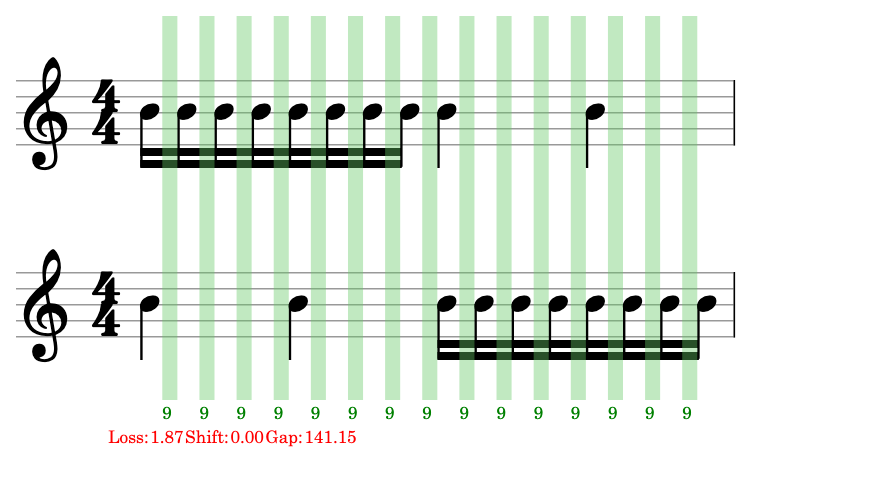
We also test keyboard selection, font loading, and export in Chromium, Firefox, and WebKit. You can now follow coverage, bundle size, and other measurements from release to release and open the score studies behind a change.
...in a smaller package!
The compressed npm tarball went from 11.24 MiB to 2.33 MiB. We removed a bunch of hidden duplication, pulled out debug symbols, source maps, and other cruft not needed during runtime. (You can still get it all back with a custom build though.)
Bonus: VexTab 7
VexTab has leveled up with a whole new grammar. The previous grammar was way too limited, and I wanted to make sure that users could produce almost any kind of notation without having to write any code.
We went through a couple of major-version iterations to get this right. V5 introduced responsive scores and printable parts. V6 gave it a new grammar, and V7 lets you import MusicXML and LilyPond scores. Oh, and the piano you heard at the top of this post is VexTab.
Here's a guitar chord melody in VexTab.
Learn more about VexTab here: VexTab Tutorial.
Lots more to see!
Okay, there's tons of new stuff in VexFlow, and I could barely scratch the surface in this post. See What's new in Vexflow? for a complete list of improvements since VexFlow 5.0. Enjoy!